
Snappy Code

Apps for Mac, Apple TV, iPhone and iPad.

Snappy Code is a small independent studio. We build the kind of apps we wanted to use ourselves, then keep improving them with the people who use them.

Apps

Three apps so far: one for every Apple screen, two for the Mac.

Snappier IPTV app icon

Snappier IPTV

A fast, polished player for your own IPTV subscription.

Live TV, movies and series from your existing provider, presented properly on every Apple device you own. Snappier IPTV is a player app. It does not supply channels or content, so you bring your own subscription and it does the rest.

  • A TV guide that fills its own gaps. Snappier ships with its own EPG service, so you still get programme listings when your provider's guide is missing or incomplete.
  • Up to nine channels on one screen. Multi-screen layouts for match day, news day or just not choosing.
  • Built for sports fans. Live fixtures, league tables and pinned teams, with a jump straight from the schedule to the channel.
  • Movies and series with proper artwork. Posters, ratings and season browsers from TMDB, with watch progress that follows you across devices.
  • One app, the whole household. Profiles, parental controls and Link Family for setting up a child's Apple TV or iPad without handing over your own profile.
  • Snappier Server, free on the desktop. A companion for macOS, Windows and Linux that adds recording, downloads, server-side catch-up and a web interface.
Available on
  • iOS
  • iPadOS
  • tvOS
  • macOS
Languages
11, including English
Support
Directly from the developer by email
ModelShelf app icon

ModelShelf

A browser for your 3D print files.

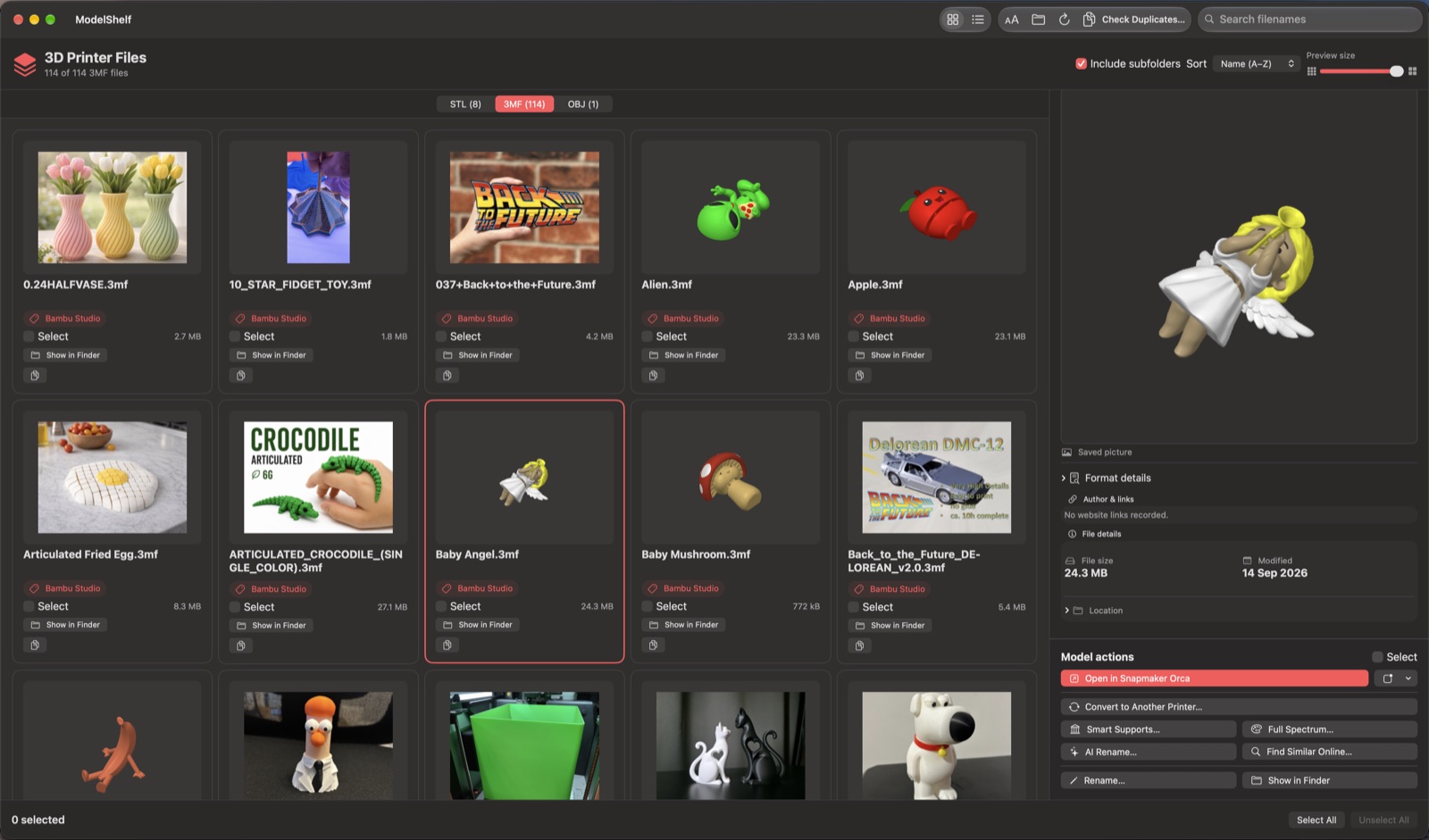
Point ModelShelf at the folder where your 3MF, STL and OBJ files live and it becomes a gallery: saved slicer previews, generated thumbnails and a 3D view you can orbit. Built for people whose downloads folder has become a print library.

  • See what each file actually is. Cover and plate pictures straight from the slicer, plus the source app, designer and links recorded inside the file.
  • Open in the slicer you use. Bambu Studio, OrcaSlicer, Snapmaker Orca, Orca-Flashforge, PrusaSlicer and Cura are found automatically.
  • Convert a project for another printer. Re-target a Bambu or Orca-family project to a Snapmaker U1, FlashForge or Bambu profile and save a copy, with every kept, adapted or dropped setting listed.
  • Tidy up safely. Find exact duplicates, rename in place and move batches to the Trash after a review. Nothing is ever deleted outright.
Available on
  • macOS
Formats
3MF, STL and OBJ
ModelShelf library window showing a grid of 3D model previews
The library view on a Mac. Open the picture to see it full size.
SnapCompress app icon

SnapCompress

Drop in videos, get smaller files back.

A Mac app for shrinking video without a command line. Drag files onto the window, pick a preset or set the format, quality and resolution yourself, and SnapCompress runs the whole batch for you.

  • Presets for the usual jobs. Ready-made presets for sharing and archiving, and your own settings saved as reusable presets.
  • Any common format out. MP4, MOV, MKV, WebM and GIF, or strip the audio to M4A.
  • Resolution and quality on a dial. Keep the original or scale to 4K, 1080p, 720p or 480p, with five quality steps or a custom bitrate.
  • Set it going and walk away. A history of every run, a notification when it finishes, and an option to put the Mac to sleep afterwards.
Available on
  • macOS
Encoding
Powered by FFmpeg
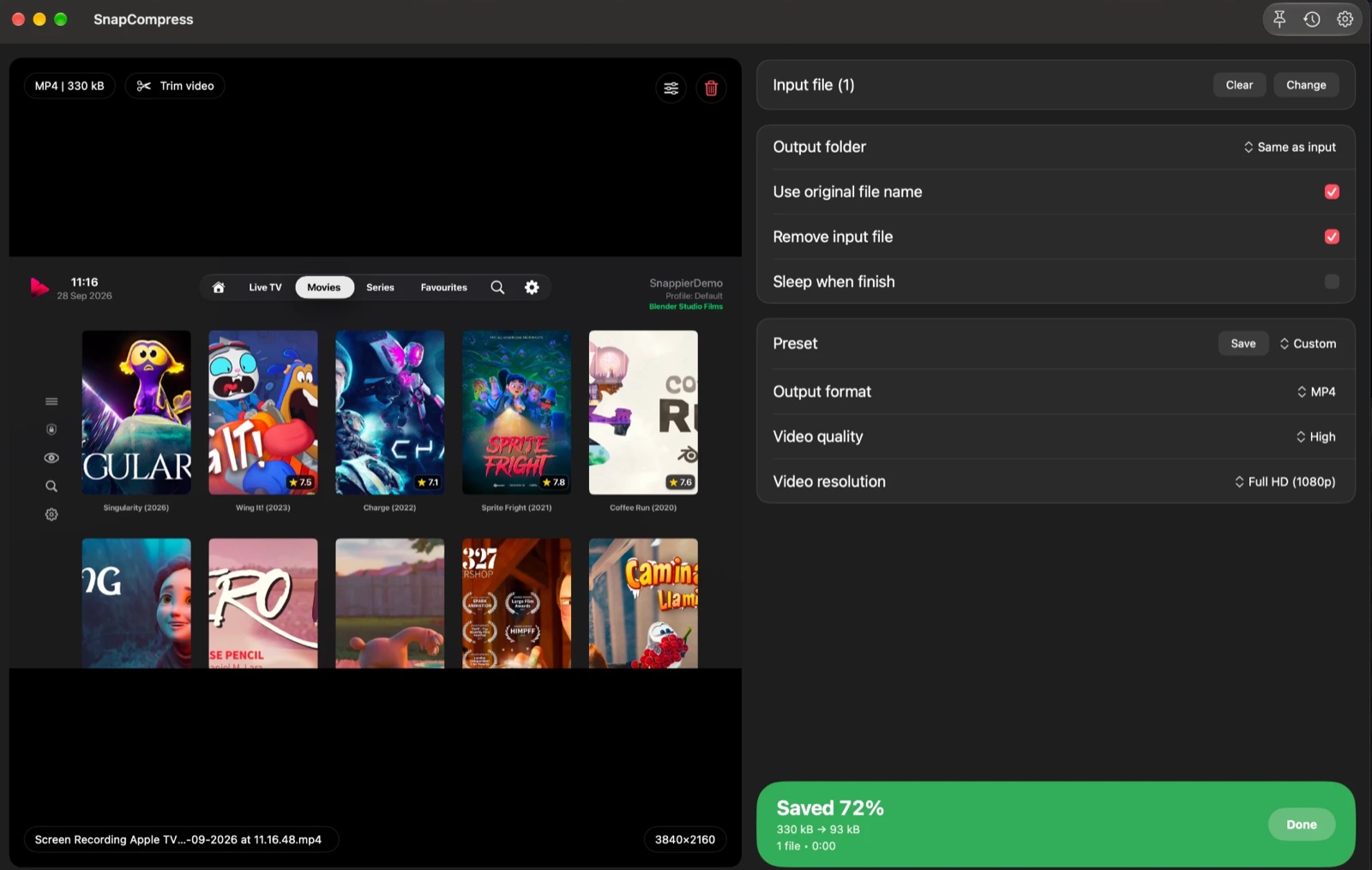
SnapCompress window on a Mac after compressing a 4K screen recording, showing the preview, output settings and a 72% saving
A finished job in SnapCompress. Open the picture to see it full size.

Contact

Questions, bug reports and feature requests are all welcome. Email feedback@snappycode.co.uk and the developer will reply.